Showing posts with label Business. Show all posts

Thursday, 14 March 2013

Can you Afford £10 per Week to Significantly Help Your Business?

Can you afford £10 a week to significantly help your business reach its market? That's what we're offering you with this Social Media Management entry level package.

We all know that social media is important to help you reach your market online. However, we also know that many people either aren't that comfortable using social media platforms and don't have the time and resources to make themselves as efficient as they need to be.

That's where we come in. For only £10 per week we can work with you to get your content, news, stories, competitions, offers etc to your market. PLUS, if you're an Inverclyde Business you can also benefit from our 10,000+ local followers because we'll also promote you to them for free, included in your weekly fee (see below for more info)

We start with your piece of content and then use the most appropriate social media platform to reach your market. So, if you have a photo we can promote that through your Facebook, Twitter or Google+ Account. If you have a video, we'll promote that on You Tube and link to it via your other social media channels. If it's an article, we'll put it into a Blog and promote it via your other Channels.

Now, here's the great part about our offer. Even if you don't have a Facebook or Twitter or Google+ or Linkedin Page or Blog, we'll set one up for you. For £10 per week your business can have professional social media platforms on all the major platforms and have your content marketed by proven experts in the field to reach your target market.

You can afford £10 a week for that can't you? Here's how it works...

Here's our view of how to grow your business using social media. You produce a good piece of content; We then market that content through your social social media channels; We then engage with people who take an interest in your content and through that you grow your following. Every piece of content should add another layer of followers to your business just like the rings in a tree trunk. Except that with social media you don't have to wait a year to add another layer; you can add 2 or 3 a week or even 2 or 3 a day if you take the time!

With our Social Media Management Entry Package you still have absolute control over your Business because you're still in charge of producing the content.

What we then do for you is to take that content and take it to your market via your most appropriate Social Media Platform. And if you don't have that platform, we'll create it for you. PLUS If you're an Inverclyde Business you also get free promotion by us to our 10,000 local followers.

Once we market your content, we'll also check your platforms daily to see if there has been interaction and engagement. We'll then answer on your behalf if appropriate and if it isn't we'll let you know so that you can respond.

In summary, here's the sort of services we can provide for you for your £10 per week;
  • If you don't yet have a Facebook Page or Twitter Account or Google+ Page or Linkedin Company Page or Blog etc we'll create one for you. We've done this dozens of times for clients. It'll look great and will reflect really well on your company
  • We'll take the content that you create and market that on the most appropriate platform 
  • We'll promote your content in local forums and basically attract relevant followers to your brand
  • We'll engage with people who comment on your post and refer to you where appropriate
  • We'll categorise your followers so that future content can be targeted to the most appropriate market
  • We'll give you a monthly report telling you what progress you've made. 
What you get for your £10 per week is an hour of our time per week. Don't confuse our hour on Social Media with your Hour on Social Media. We can do a LOT for your company in an hour. In an hour we could be marketing 2 pieces of content a week on your behalf or creating you a new Social Media Platform. £10 per week will significantly progress your company's brand and profile.

Just think of the cumulative effect. In a year you can have thousands of new followers; professionally managed social media platforms and LOTS of new business - all for only £10 per week.

If you're interested or would like the chance for some further discussion, just contact us at the details below.

Regards

Willie Wilson
My Town Homepage

Willie Wilson
Managing Director
My Town Homepage
Email admin@mytownhomepage.co.uk
Tel - 07932 644455
Website - http://www.mytownhomepage.co.uk
Facebook - https://www.facebook.com/mthsocialmedia
Facebook - https://www.facebook.com/mytownhomepageinverclyde
Linkedin - http://uk.linkedin.com/in/williewilson1


If you think this might not be for you, check out our other services. 


  • Assessment - Where are you on the Social Media Evolution? - Free Analysis
  • Training - Introduction, Basics, Advanced - Free Manuals and Bespoke Training from only £15 per Hour
  • Establish - We Can Get you Started on Your Social Media Journey - From £30
  • Promote - Publicise You through our own Network of Followers - £40 per month
  • Strategy - Your 10 Point Social Media Health Check - Your Strategy From £49
  • Growth - We guarantee to grow your Likes OR followers - From only £10 per month
  • Management - Let us Manage Your Social Media - £49 per month or £499 per year
  • Entry Level Support - Find out what we can do for you for £10 per week


  • Wednesday, 23 January 2013

    Overview of our Services

    This is a list of links to our main services.  
      • Assessment - Where are you on the Social Media Evolution? - Free Analysis
      • Training - Introduction, Basics, Advanced - Free Manuals and Bespoke Training from only £15 per Hour
      • Establish - We Can Get you Started on Your Social Media Journey - From £30
      • Promote - Publicise You through our own Network of Followers - £40 per month
      • Strategy - Your 10 Point Social Media Health Check - Your Strategy From £49
      • Growth - We guarantee to grow your Likes OR followers - From only £10 per month
      • Management - Let us Manage Your Social Media - £49 per month or £499 per year
      • Entry Level Support - Find out what we can do for you for £10 per week
      If you'd like to discuss any of these services with us you can contact us as follows;

      Willie Wilson
      Managing Director
      My Town Homepage
      admin@mytownhomepage.co.uk
      07932 644455
      Website - http://www.mytownhomepage.co.uk
      Facebook - https://www.facebook.com/mthsocialmedia
      Facebook - https://www.facebook.com/mytownhomepageinverclyde
      Linkedin - http://uk.linkedin.com/in/williewilson1

      Wednesday, 16 January 2013

      Maunual #1 - Introduction to Facebook for Businesses


      Welcome to Training Manual #1 - Introduction to Facebook for Businesses. If this Manual whets your appetite for some bespoke one-to-one training we can arrange this for only £20 per hour. Details are at the end of the Manual. If you'd like to connect to anything else we do then here are some suggestions; 


    1. Assessment - Where are you on the Social Media Evolution? - Free Analysis
    2. Training - Introduction, Basics, Advanced - Free Manuals and Bespoke Training from only £15 per Hour
    3. Establish - We Can Get you Started on Your Social Media Journey - From £30
    4. Promote - Publicise You through our own Network of Followers - £40 per month
    5. Strategy - Your 10 Point Social Media Health Check - Your Strategy From £49
    6. Growth - We guarantee to grow your Likes OR followers - From only £10 per month
    7. Management - Let us Manage Your Social Media - £49 per month or £499 per year
    8. Entry Level Support - Find out what we can do for you for £10 per week


    9. This document is a step-by-step guide through the items which were discussed during Session 1 of My Town Homepage’s  “Social Media for Business” Training Course which has been delivered recently to several local organisations including Greenock Chamber of Commerce.  

      In this Manual...
      1. Facebook Home / Newsfeed
      2 Using a Facebook Personal Profile for Business
      3 Creating a Facebook Business Page
      4 Adding a Profile Photo and Cover Photo
      5 Basic Settings
      6 A Status Update
      7 Conclusion and Next Manual

      1. Facebook Home / Newsfeed

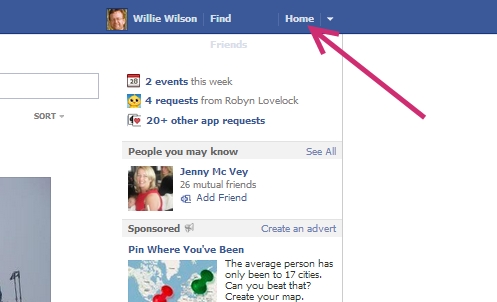
      When you log in to your Facebook Profile Page you have two main pages that you can view namely your “Home” and your “Timeline”. The first page which opens when you first log-in is your “Home” Page. You can access this page at any time by clicking on “Home” at the top right corner of the page. 


      Your “Home” (what used to be called your “Newsfeed”) is the place where you can see posts from all of your Friends on Facebook . It’s Facebook which decides which articles you see but, in general, they tend to be the items from your Friends that have had the most engagement i.e. the ones that have the most “Likes”, “Shares” or “Comments”. Posts from your “Close Friends” and your “Family” will also be given a higher ranking.

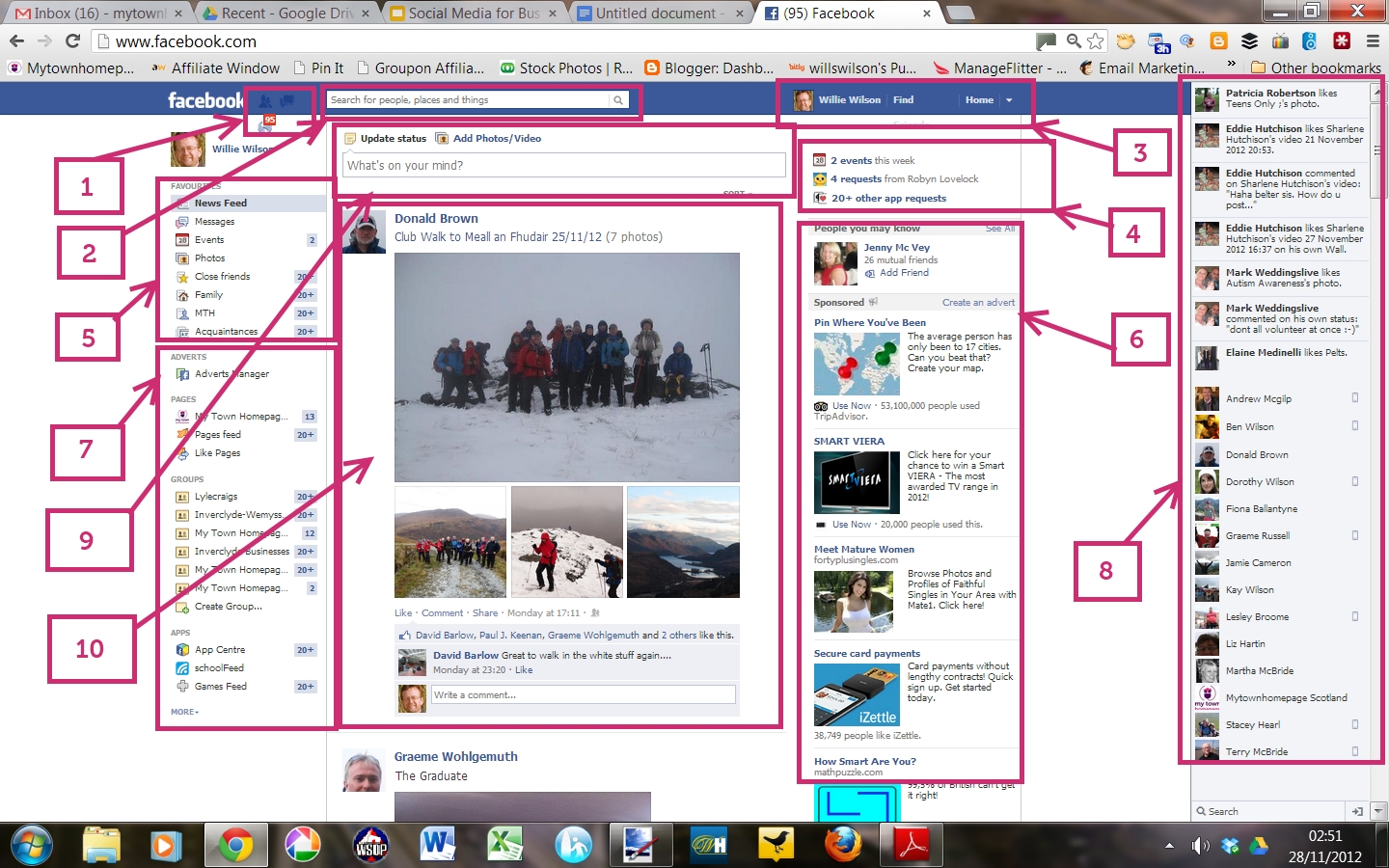
      This image gives a quick tour around your Home Page.

      1 -  Friends, Notifications and Messages - This is where you can see any new Friends Requests; check your latest notifications and browse any messages you have.

      2 - The Search Bar - Search Facebook here for any other people or Pages.

      3 - Home and Profile - From here you can link to your “Home” page or your “Timeline” page. You can also access your settings and privacy settings by clicking the small arrow.

      4 - Apps Summary - From here you get a summary of requests from any Apps that you have activated.

      5 - Favourites - You can access your Favourite sections here like  Events, Messages, Photos etc. You can also access any “Friends Lists” that you’ve set up like “Family”, “Close Friends”, “Business Acquaintances” etc.

      6 - Facebook Adverts - You can look at and creat an advert from here.

      7 - Other Sections - You can access all other parts of Facebook from here like “Pages” (where you can see all the Business Pages that you’ve “Liked”) ; “Groups”  ; Apps; Interest Lists etc

      8 - Chat - If activated, you can chat with any of your Friends that have also activated this feature

      9 - Status Update - this is where you can add content to Facebook. Anything added here will also show up on your “Timeline”.

      10 - Newsfeed - This is where updates and posts from people and Pages that you follow will appear. Just scroll down to see more.

      We will be going into these sections in more depth in future Information Manuals.

      2 Using a Facebook Personal Profile for Business

      In general, Facebook wants you to use “Business Pages” if you are a Business however it is still allowed to use your “Personal Profile” for business purposes. Facebook recognises that people who work for businesses use Facebook as individuals. You should therefore use your “Personal Profile” for business purposes in the following ways.

      Events - If your business has an event coming up, set up an Event Page and invite all your Friends to it. Encourage your friends to also invite their friends. It’s a good way to quickly spread the word about something on Facebook.

      Groups - Only individuals can join Groups on Facebook. Your “Business Page” will not be allowed to join Groups. Groups are often very useful for business purposes. For example you could join the “Inverclyde Businesses” group or the “connectING” Group which encourages networking among Inverclyde Businesses. You can also set up a Group yourself. Membership can be set to be “private”, “invited” or “open”

      Friends Lists - You can set up any number of “Friends Lists” on Facebook. A Friends List lets you use Facebook effectively for business purposes and for personal purposes and keep both parts separate. It means that you can choose which lists of friends sees certain posts and status updates. It means you can put personal items on your Timeline which is only for your Family or you can put on  business information which is only relevant to your “Business Acquaintances”.

      When you click on a Friends List (as detailed in section  5 above you only see posts and updates from the people in that list. It means you can use Facebook in much more specific ways rather than just seeing items from everyone at the same time.

      Interest Lists - You can also set up “Interest Lists” where you can group Business Pages that interest you. For example you could set up an “Inverclyde Businesses” Interest List or a list relevant to your industry with all your competitors.  When you click on these Lists you just see posts from the people on your List.

      Apps - Apps let you add extra functionality to your Personal Profile. There are thousands to choose from however most will be “social” in nature. You’ll be able to add and use Apps that have more relevance to your business under your Business Page. More details on Apps will be in further Information Manuals.

      Status Updates - As mentioned above, when you post content on your Timeline you can choose who sees that content.  This allows you to use Facebook in a way that is targeted to your Business  acquaintances and contacts.

      I would be happy to give further detailed information on any of the above features. Please contact me using the details at the end of the document.

      3 Creating a Facebook Business Page

      Just a reminder that you need to have a Personal Profile on Facebook to be able to create a Business Page.  Here’s one way that you create a Page.

      1. Go to the Home Page
      2. Scroll to the bottom of the adverts on the right of the Page
      3. Click “more”
      4. Click “Create a Page”

      Here’s another

      1. Click on the small down arrow at the top of your Home Page
      2. Scroll to the bottom of the Page
      3. Click “Create a Page”

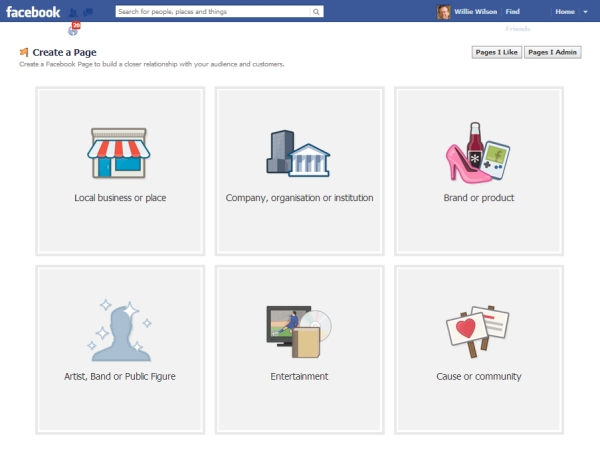
      You’ll see this screen...


      Click on the icon that suits you best. Most of the time it’ll be Local Business or Place but it may be another.

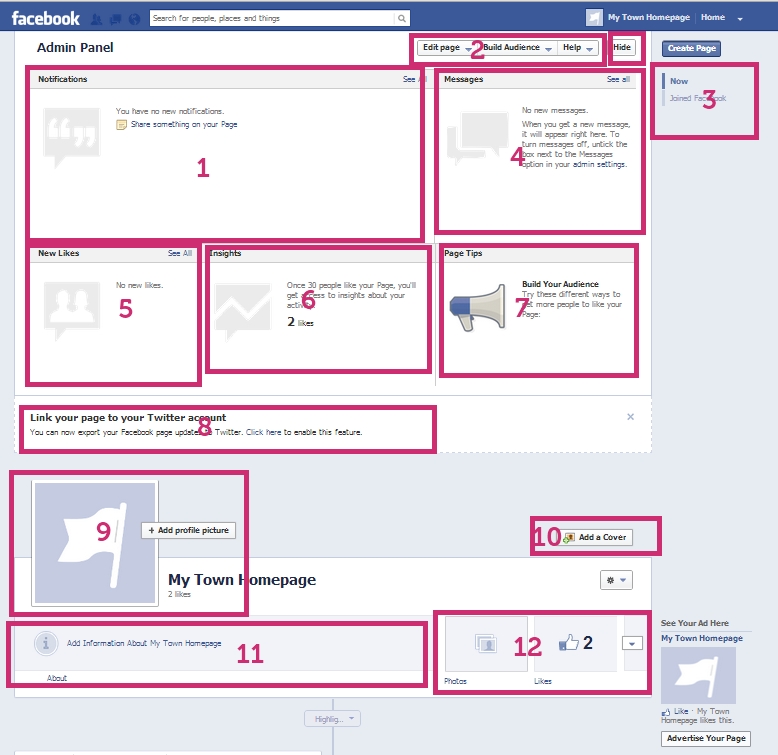
      You’ll then create a blank Page. Here’s a quick tour...


      1 - Admin Panel - The Admin Panel id shown at the top of the Page. It’ll give you lots of useful info about your Business Page. The first section is “Notifications”. Here, you’ll get details of everyone who likes, comments, shares and posts on your Page.

      2 - Edit Page - This is where you can get to the settings that you need to create before launching your Page (more info later).

      3 - Timeline - Once you’ve been going for a while you can use this Timeline to go back to your previous posts. You can also post status updates in the past. For example you could add a photo that marks the creation of your company, say, 10 years ago, and then add milestones that you reached along the way. Your Timeline will then allow you to go back in time to see these posts.

      4 - Messages - This is the section that allows you to see any messages sent to your Business Page.

      5 - New Likes - This is the list of everyone (Business Pages or People) that have “liked” your Page. Becoming a “Like” for a Business Page is the same as becoming a “Friend” for a Personal Profile.

      6 - Insights - After you’ve achieved over 30 Likes, you’ll start getting stats about your Business Page. More info on this will be given in Session 3.

      7. Page Tips - Facebook gives you random tips in this section.

      8. Suggestions - In the early stages of your Page’s life, Facebook will give you suggestions here about things you can do to improve your settings. This section stops after a while.

      9. Profile Picture - This is the photo that is shown when you post items on other’s Pages.

      10. Cover Photo - This is the large photo that appears at the top of your Business Page. This will be the first image that people see when visiting your Page so it’s important.

      11. Information - Once you add details to your “Settings” information about your company will appear here in summary. When people click on this section they are given more info about your company.

      12 Apps Bar - You’ll be able to see up to 4 thumbnails in this section. The thumbnails are very prominent so they’re quite important. The first thumbnail is “Photos” and its position can’t be changed. Other Apps can be added to the other 3 thumbnails. An additional 8 Apps can be added and viewed by clicking the small down arrow. More info about Apps in future Sessions.

      13 - Hide - This button lets you hide the Admin Panel. If it’s hidden the button will change to “Show” so that you can view your Admin Panel.

      4 Adding a Profile Photo and Cover Photo

       The following image sets out the dimensions that your cover photo and your profile photo should be. If you can’t make photos exactly this size the Facebook will let you drag and fit the photo you are uploading. 


      5 Basic Settings

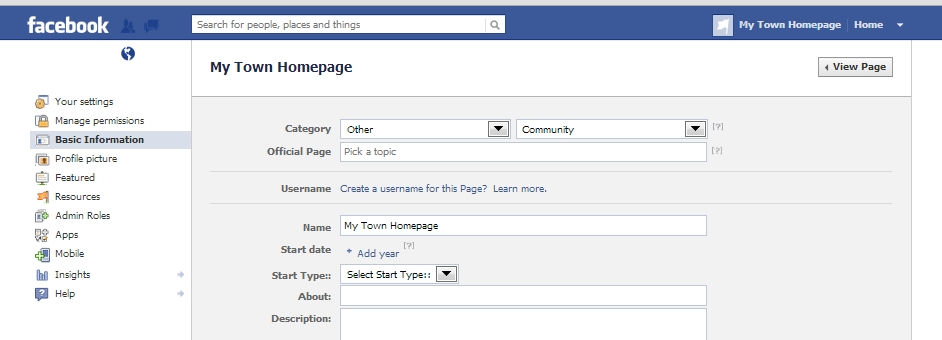
      Before you publish your Page you should make basic adjustments to your Page settings. You can access your Page settings by clicking “Edit Page” in your Admin Panel and then “Update info”. This takes you to this section...


      You should now click on each section on the left in turn and fill in as many details as you can down to and including Basic Information.  Most of these items are self explanatory. Please contact me if you would like my opinion on any of these settings.

      6 A Status Update

      If you have followed the above then you will now be ready to post a “Status Update” and start using your Business Page. Make sure you “Page Visibility” setting in the “Manage permissions” section is set appropriately.

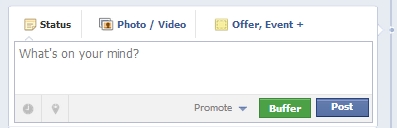
      A Status Update looks like this...


      This is fairly self-explanatory. You can post words; or words and pictures; or,  depending on what type of Business Page you have, you can add events, offers, milestones or questions. You can also add links from websites or links to other Facebook Pages if you’d like to link to them. More details on the power of links and how to use them effectively will be in Session 2.

      7 Conclusion and Next Manual

      The above information sets out how to get started on Facebook for Businesses. Our next Information Manuals will go into Facebook and Twitter in more depth. Session 2 covers “Facebook Basics for Businesses” and Session 3 covers “Advanced Facebook for Businesses”

      If you would like any further information on anything discussed in this Information Manual please contact Willie Wilson on the details below.

      My Town Homepage also offers bespoke targeted Social Media Training to meet your company’s needs whatever your level of expertise. We offer both 1-to-1 training and Group sessions and both are highly affordable starting from only £20 inc vat per hour.

      Willie Wilson
      Managing Director
      My Town Homepage
      admin@mytownhomepage.co.uk
      07932 644455
      Website - http://www.mytownhomepage.co.uk
      Facebook - https://www.facebook.com/mthsocialmedia
      Facebook - https://www.facebook.com/mytownhomepageinverclyde
      Linkedin - http://uk.linkedin.com/in/williewilson1