Wednesday, 20 March 2013

Why You Should Use Social Media - For Businesses, Groups and Agencies


Welcome to the latest instruction manual from My Town Homepage which, this time, covers “Why You Should Use Social Media”. It is relevant for Businesses, Community Organisations, Voluntary Organisations and Public Agencies.

This is the latest free Training Manual produced by My Town Homepage. Others produced so far are;


If this Manual whets your appetite for more Social Media tips and advice here are some more items available from My Town Homepage.

  • Assessment - Where are you on the Social Media Evolution? - Free Analysis
  • Training - Introduction, Basics, Advanced - Free Manuals and Bespoke Training for individuals and groups
  • Establish - all you need to get started on your social media journey.  
  • Promote - If you’re from Inverclyde you can be promoted to over 10,000 local followers
  • Strategy - You can have a quick 10 point social media health check or you can have a detailed and comprehensive strategy which will plot your future social media direction.
  • Growth - Guaranteed methods to grow your Likes or followers
  • Management - If you don’t have the time or the skills My Town Homepage can manage your social media account for you.

Details of how to get in touch are given at the end of the document.

This document is a step-by-step guide through the items which were discussed during a presentation made to the Scottish Association of Local Sports Councils Annual Conference held at Westerwood Hotel, Cumbernauld on Saturday 23rd March 2013.
The document covers the following items;
Section 5 - Creating Content

1. My Town Homepage Experience

My Town Homepage can offer an almost unique perspective to this subject given the background of Managing Director Willie Wilson.

Willie started My Town Homepage in May 2010 but prior to this had been involved in working with voluntary organisations in local government areas at all levels for just short of 25 years. This work included;


  • Secretary to Motherwell District Sports Council from 1990 to 1996
  • In charge of Sports Development Units in Motherwell, North Lanarkshire and Inverclyde Councils from 1990 to 2005
  • The Events Co-ordinator for all Inverclyde Council Events from 1996 to 2010
  • The Community Learning and Development Lead Officer for Inverclyde from 1997 to 2005
  • The Community Council Liaison Officer for Inverclyde from 2005 to 2010
  • The Voluntary Sector Liaison Officer for Inverclyde from 2005 to 2010
  • Responsible for the Community Engagement Team in Inverclyde from 1997 to 2010
  • Responsible for the Grants to Voluntary Organisations Fund for Inverclyde from 2003 to 2010
Willie established My Town Homepage in 2010 which now has two parts.

The first is a website which delivers a community portal for Scotland’s 32 Local Authority areas. The website aims to be a community resource by providing a wide range of information, news, notices and offers. The Inverclyde Portal will be developed first to make it an example of good practice which will then be rolled out to the other 31 Local Authority areas.

The other arm to My Town Homepage is the Social Media Consultancy service. This was developed due to the company’s practical experience of promoting and growing My Town Homepage’s followers of over 10,000 on social media. The company therefore has had tangible examples of social media knowledge and success and doesn’t just rely on theory.
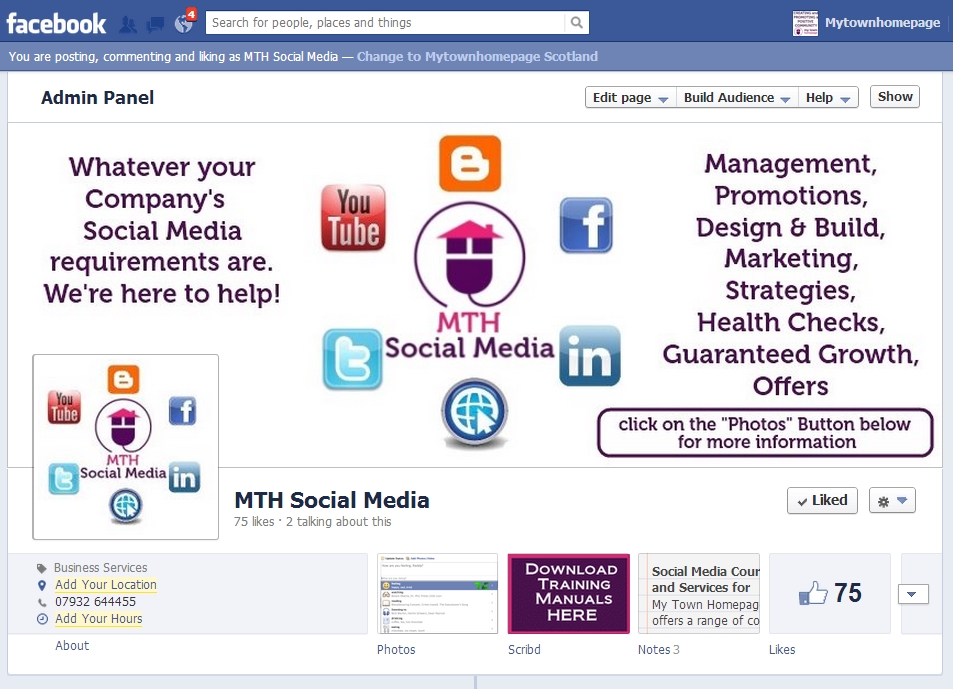

The Social Media Consultancy service has now delivered a wide range of products to Businesses including training sessions for Greenock Chambers of Commerce,  Inverclyde Council and many individual people and businesses however, given the company’s Voluntary Sector background, they are now spreading their net to reach voluntary and community groups.

2 Traditional Communication vs New Communication

Part of the reason why Groups, Clubs, Businesses and Organisations should use Social Media lies in an examination of the current ways that are used to  traditionally promote activities.
Most of the current methods rely on what people are currently comfortable with. The communication tends to be;

One Way Communication - Along the lines of traditional advertising campaigns, the communication is “AT” the target audience rather than a conversation “WITH” them.

No Engagement - Because it’s one way there isn’t an opportunity to discuss or debate your message. There’s also very little feeling of ownership by the person receiving the message.

Non-Targeted Communication - Many of the methods tend to put a message into the general public domain and if they happen to reach the desired audience then this is usually by chance rather than design.  

We call it a “blunderbuss” or “loudspeaker” approach. Basically you have a message which you want to shout as loud as you can in order that as many people as possible will hear. If you don’t reach your target audience you’ll try shouting a little louder and so on. You think that this will allow more people to hear. In reality all you do is make more noise and this usually has an opposite effect to that which is desired.

The new way of marketing uses a different approach. It’s not one-way: It’s multi-way. It’s targeted. It’s engaging. The new way has 4 main parts;

Part 1 - PURPOSE

Be sure of what your organisation does, why it exists, what its main purpose is. If you’re sure of this it’ll be a lot easier later on to produce pieces of content that are relevant to your organisation and will have the desired effects using Social Media.

Part 2 - ATTRACT

If you’re sure of what your purpose is and you share that through your content on Social Media, you’ll attract people who believe what you believe.

Part 3 - BUILD TRUST

Once you attract people who believe what you believe by sharing content about what your purpose is, those people will trust you. They’ll trust you enough to ENGAGE with you and they may even trust you enough to RECOMMEND you.

Part 4 - GROW

When people engage with you and recommend you then you’ll grow your following

If someone recommends you to their friends, studies have shown that 78% of their friends will listen to their recommendations.

Studies have also shown that only 14% trust adverts, or put another way, only 14% trust messages that are shouted AT them (traditional way).

What this means is that you’re much more likely to be heard and listened to and followed in future by using the new method of communication that the traditional way.



3 The Social Media Growth Cycle

The Social Media Growth Cycle is your way to make social media work for your  Organisation.

The Social Media Growth Cycle will help you define;

  • What your purpose is
  • How to create content that will enable people to believe what you believe
  • How to market that content using social media
  • How to engage with people so that they’ll build trust
  • How to grow and keep track of your new followers

Each time you go round the Social Media Growth Cycle you have the potential to add a layer of followers and every layer you add allows your followers and reach to grow.
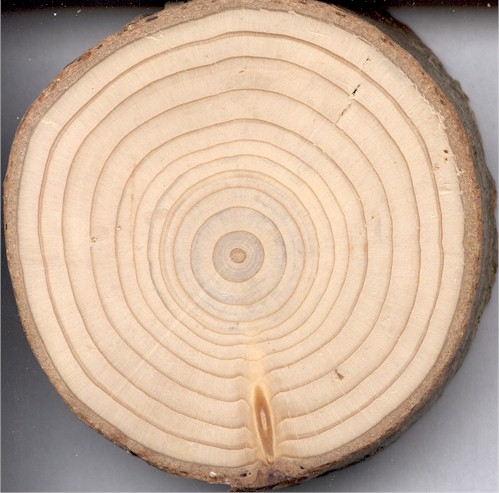

But unlike the rings of a tree that take a year to add a layer, you can add a layer after every Social Media Growth Cycle which could be 2 or 3 times a week or even 2 or 3 times a day if you have good enough content.

4 Step 1 - Define Your Purpose

Spend a bit of time deciding and being clear what your purpose is and then make all of your actions reflect that purpose. Many organisations get this the wrong way round. They get used to carrying out a set of actions that they’ve always done without really stopping to consider if the actions are appropriate.

So take a bit of time to remind yourself not only of what you do but WHY you do it. Make a list of some of those reasons and keep them in mind when we come to the next stage in the Growth Cycle

When we did this exercise in preparation for the presentation to the Scottish Association of Local Sports Councils Annual Conference we came up with some suggestions for Sports Councils. The purpose of a Sports Council could be;

  • To improve health
  • To increase physical activity levels
  • To increase sports participation
  • To promote role models
  • To engage with young people
  • To promote examples of excellence
  • To promote examples of teamwork

We would encourage you to take some time to reconnect with your purpose because it will help you with Step 2.

5 Step 2 - Create Content to Share Your Purpose

Content is King in social media. If you have nothing interesting or engaging to share then you won’t attract people to follow you no matter how active you are.  Equally if you have the most interesting subject in the world and you don’t take the time to create content around it then, again, you won’t attract new followers.

Again, we did some work for Sports Councils and came up with the following list of possible content for them ;

  • Competitions that have taken place
  • Awards gained
  • Matches won
  • Forthcoming Events
  • Grants available
  • Advice available
  • Links to...
    • Local Members' stories
    • Links to National stories
  • Volunteering examples
  • Coach Education
  • etc, etc, etc

Take time to think of your own Organisation’s content. Come up with a list of content that you could use to share coming out of what you identified your purpose to be.

6 Step 3 - Market Your Content Using Social Media
Social Media offers many different ways that you could use to market your content. Rmember the diagram that we showed above to demonstrate traditional forms of marketing.
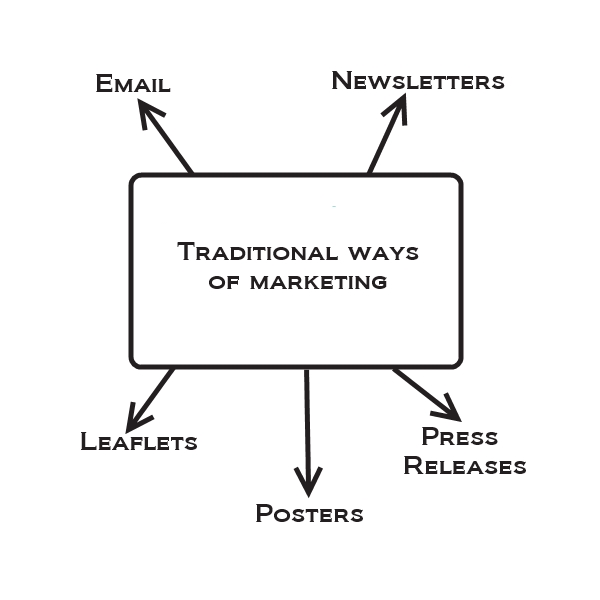
The traditional way is one-way and not very targeted.

Social Media can expand significantly on this, for example
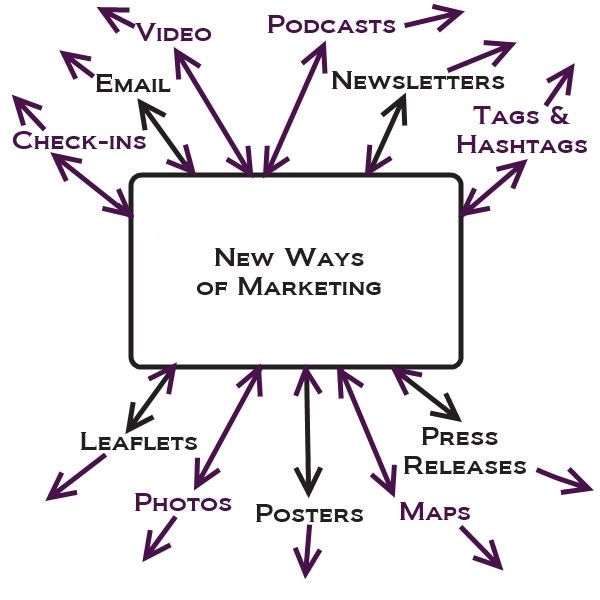
The new way can add a lots of options to market your content. Ways that are very flexible like video and podcasts. It's like your organisation having your own TV and Radio Station where you're the one that controls the content. All it takes is a little bit of time and effort. In the past it took technology but these days all it needs is a modern smartphone.

Also notice that the arrows are now not one-way. In fact they're multiple way. Because every person that you reach can contact you but they can also contact all of their own connections.

7 Step 4 - Engage with Your Market

"Engaging" sounds a bit technical or possibly even difficult but in the social media world it's not an onerous thing to do.

It's like a snowball effect. If you move around, people who believe what you believe will be attracted to you and stick to you. But you have to make some noise, you have to get involved, you have to be noticed. That means you have to spend some time being "active". Things like.....
These are some of the verbs that you need to become very familiar with if you're going to be a success on Social Media. And the thing is that there's no one way that works. In the way of the famous sports company "Just do it". There's no real formula to this other than time and effort.

Obviously you have to be politically aware to protect your brand so you can't share or comment on anything and you can't say anything. You have to be responsible but, other than common sense, use the techniques that work for you.

8 Step 5 - Grow and Keep Track of Your Followers

The final piece in the cycle is to grow followers and this will happen proactively and reactively.

By completing the above Social Media Growth Cycle, people will take it upon themselves to follow your organisation. On the other hand, some others may need some prompting to follow you. So you need to spend some time reaching out to others.

Who do you reach out to? People who believe what you believe. People who "engage" with you. Ask them to "Like" your Facebook Page.

Twitter is great for growing a following. Go to people who believe what you believe and follow their followers. Chances are they'll follow you back. Do that with with people who follow you and your following will quickly grow.

And once you've got your following you tend to keep them. Few people who take the time to follow you will take the time to un-follow you. Why should they? They believe what you believe and you'll be giving them great content.

The final great thing about social media is that it's also really easy to categorise your followers. You can put them into lists so that when you share a piece of content in future you can be more specific about who that content goes to. You can send it to

  • your racquet sports list
  • your ball sports list
  • your female list
  • your 15 to 24 list
  • list from a specific town
  • etc. There's no limit.

9 Next Steps - Going from WHY to HOW

This Manual discussed the reasons WHY you should use Social Media for your Business, Community Organisation, Voluntary Organisation and Public Agency.

Our next FREE Manual which will be published soon will discuss the practical ways around HOW you can do that using some of the most popular platforms of  Social Media.

In the meantime, if you like what we say and...
YOU BELIEVE WHAT WE BELIEVE
follow us at any of the links below.

Regards

Willie Wilson
Managing Director
My Town Homepage
admin@mytownhomepage.co.uk
07932 644455


If this Manual whets your appetite for more Social Media tips and advice here are some more items available from My Town Homepage.

  • Assessment - Where are you on the Social Media Evolution? - Free Analysis
  • Training - Introduction, Basics, Advanced - Free Manuals and Bespoke Training for individuals and groups
  • Establish - all you need to get started on your social media journey.  
  • Promote - If you’re from Inverclyde you can be promoted to over 10,000 local followers
  • Strategy - You can have a quick 10 point social media health check or you can have a detailed and comprehensive strategy which will plot your future social media direction.
  • Growth - Guaranteed methods to grow your Likes or followers
Management - If you don’t have the time or the skills My Town Homepage can manage your social media account for you.

Thursday, 14 March 2013

Can you Afford £10 per Week to Significantly Help Your Business?

Can you afford £10 a week to significantly help your business reach its market? That's what we're offering you with this Social Media Management entry level package.

We all know that social media is important to help you reach your market online. However, we also know that many people either aren't that comfortable using social media platforms and don't have the time and resources to make themselves as efficient as they need to be.

That's where we come in. For only £10 per week we can work with you to get your content, news, stories, competitions, offers etc to your market. PLUS, if you're an Inverclyde Business you can also benefit from our 10,000+ local followers because we'll also promote you to them for free, included in your weekly fee (see below for more info)

We start with your piece of content and then use the most appropriate social media platform to reach your market. So, if you have a photo we can promote that through your Facebook, Twitter or Google+ Account. If you have a video, we'll promote that on You Tube and link to it via your other social media channels. If it's an article, we'll put it into a Blog and promote it via your other Channels.

Now, here's the great part about our offer. Even if you don't have a Facebook or Twitter or Google+ or Linkedin Page or Blog, we'll set one up for you. For £10 per week your business can have professional social media platforms on all the major platforms and have your content marketed by proven experts in the field to reach your target market.

You can afford £10 a week for that can't you? Here's how it works...

Here's our view of how to grow your business using social media. You produce a good piece of content; We then market that content through your social social media channels; We then engage with people who take an interest in your content and through that you grow your following. Every piece of content should add another layer of followers to your business just like the rings in a tree trunk. Except that with social media you don't have to wait a year to add another layer; you can add 2 or 3 a week or even 2 or 3 a day if you take the time!

With our Social Media Management Entry Package you still have absolute control over your Business because you're still in charge of producing the content.

What we then do for you is to take that content and take it to your market via your most appropriate Social Media Platform. And if you don't have that platform, we'll create it for you. PLUS If you're an Inverclyde Business you also get free promotion by us to our 10,000 local followers.

Once we market your content, we'll also check your platforms daily to see if there has been interaction and engagement. We'll then answer on your behalf if appropriate and if it isn't we'll let you know so that you can respond.

In summary, here's the sort of services we can provide for you for your £10 per week;
  • If you don't yet have a Facebook Page or Twitter Account or Google+ Page or Linkedin Company Page or Blog etc we'll create one for you. We've done this dozens of times for clients. It'll look great and will reflect really well on your company
  • We'll take the content that you create and market that on the most appropriate platform 
  • We'll promote your content in local forums and basically attract relevant followers to your brand
  • We'll engage with people who comment on your post and refer to you where appropriate
  • We'll categorise your followers so that future content can be targeted to the most appropriate market
  • We'll give you a monthly report telling you what progress you've made. 
What you get for your £10 per week is an hour of our time per week. Don't confuse our hour on Social Media with your Hour on Social Media. We can do a LOT for your company in an hour. In an hour we could be marketing 2 pieces of content a week on your behalf or creating you a new Social Media Platform. £10 per week will significantly progress your company's brand and profile.

Just think of the cumulative effect. In a year you can have thousands of new followers; professionally managed social media platforms and LOTS of new business - all for only £10 per week.

If you're interested or would like the chance for some further discussion, just contact us at the details below.

Regards

Willie Wilson
My Town Homepage

Willie Wilson
Managing Director
My Town Homepage
Email admin@mytownhomepage.co.uk
Tel - 07932 644455
Website - http://www.mytownhomepage.co.uk
Facebook - https://www.facebook.com/mthsocialmedia
Facebook - https://www.facebook.com/mytownhomepageinverclyde
Linkedin - http://uk.linkedin.com/in/williewilson1


If you think this might not be for you, check out our other services. 


  • Assessment - Where are you on the Social Media Evolution? - Free Analysis
  • Training - Introduction, Basics, Advanced - Free Manuals and Bespoke Training from only £15 per Hour
  • Establish - We Can Get you Started on Your Social Media Journey - From £30
  • Promote - Publicise You through our own Network of Followers - £40 per month
  • Strategy - Your 10 Point Social Media Health Check - Your Strategy From £49
  • Growth - We guarantee to grow your Likes OR followers - From only £10 per month
  • Management - Let us Manage Your Social Media - £49 per month or £499 per year
  • Entry Level Support - Find out what we can do for you for £10 per week


  • Wednesday, 13 February 2013

    Twitter - An Introduction for Businesses


    Welcome to our My Town Homepage Training Manual #4 - Twitter for Businesses. If this Manual whets your appetite for more, details of our other services are given at the end of the Manual

    This document is a step-by-step guide through the items which were discussed during Session 4 of the “Social Media for Business” Training Course organised by My Town Homepage and delivered recently to local organisations including Greenock Chamber of Commerce.

    This session covers “Twitter for Businesses” and should give you a sound introduction into how you can use Twitter as a tool to help your Business.

    It is mainly aimed at the level of those people who are wanting an introduction to Twitter and want to know how to use it effectively for Business.

    We're also convinced that it is better and easier to be able to build Twitter and Facebook at the same time rather than individually and separately. We'll show you how we like to do that.

    The key topics to be discussed in this Manual are as follows;

    • Why Twitter?
    • Knowing your way around your Twitter Account
    • Twitter General Basics
    • Twitter Business Tips
    • Facebook and Twitter - Why do both?
    • Tools to help you

    1. Why Use Twitter in General?

    So why use Twitter? Why spend MORE time on ANOTHER Social Media platform for your Business

    Quite simply, as one of the major social media platforms, it allows you to do things better and more easily than other major social media platforms like Facebook. In general there are many reasons why you should use Twitter including;

    • It's (relatively) simple.  In our view, it’s certainly a lot easier to use than Facebook
    • It’s easier ...
      • to find things. The search capacity on Twitter is superb and vastly superior than Facebook
      • to find followers, colleagues, gurus, competitors etc. In our opinion, the speed that you can grow on Twitter is much faster than on Facebook.
    • It’s good for ...
      • discussing a subject or topic
      • finding out what the current topic of conversation is
      • finding out what’s being talked about in your local area
    • It’s mobile
      • You can obviously use Twitter effectively on your PC in the office but it’s also effective and easy for you to use on the move using your smartphone. The nature of Tweeting, i.e short messages, lends itself well to a mobile platform

    2. Why Use Twitter for Business?

    We’ve listed below some business activities that lend themselves to being done very well on Twitter.

    From a business perspective, Twitter is good for...

    • Publicising Promotions, Sales & Offers
    • Organising and Promoting Events
    • Use as a Search Engine
    • Giving and Finding Information
    • Conversations, Communication and Engagement,
    • Listening, Responding
    • Building Relationships
    • Sharing
    • Asking
    • Linking

    These are all activities that you’ll probably want to take part in if you’re a business. We’ll discuss HOW you can do these things later in the Manual.

    3. Getting Started on Twitter

    Getting started is EASY. It's not like Facebook where you have to have a personal profile before you set up a Business Page. With Twitter if you want to set up a Twitter account for your Business, just do it.

    All you need to have is an email address that you own.

    1. Go to http://www.twitter.com
    2. Put in your name or your company's name, your email and a password.
    3. You'll be sent an email to your address to confirm
    4. That's it! All done.

    4. The Twitter Homepage

    We’ll spend a bit of time taking you through the main parts of the Twitter Homepage. This will ensure that you know your way around.

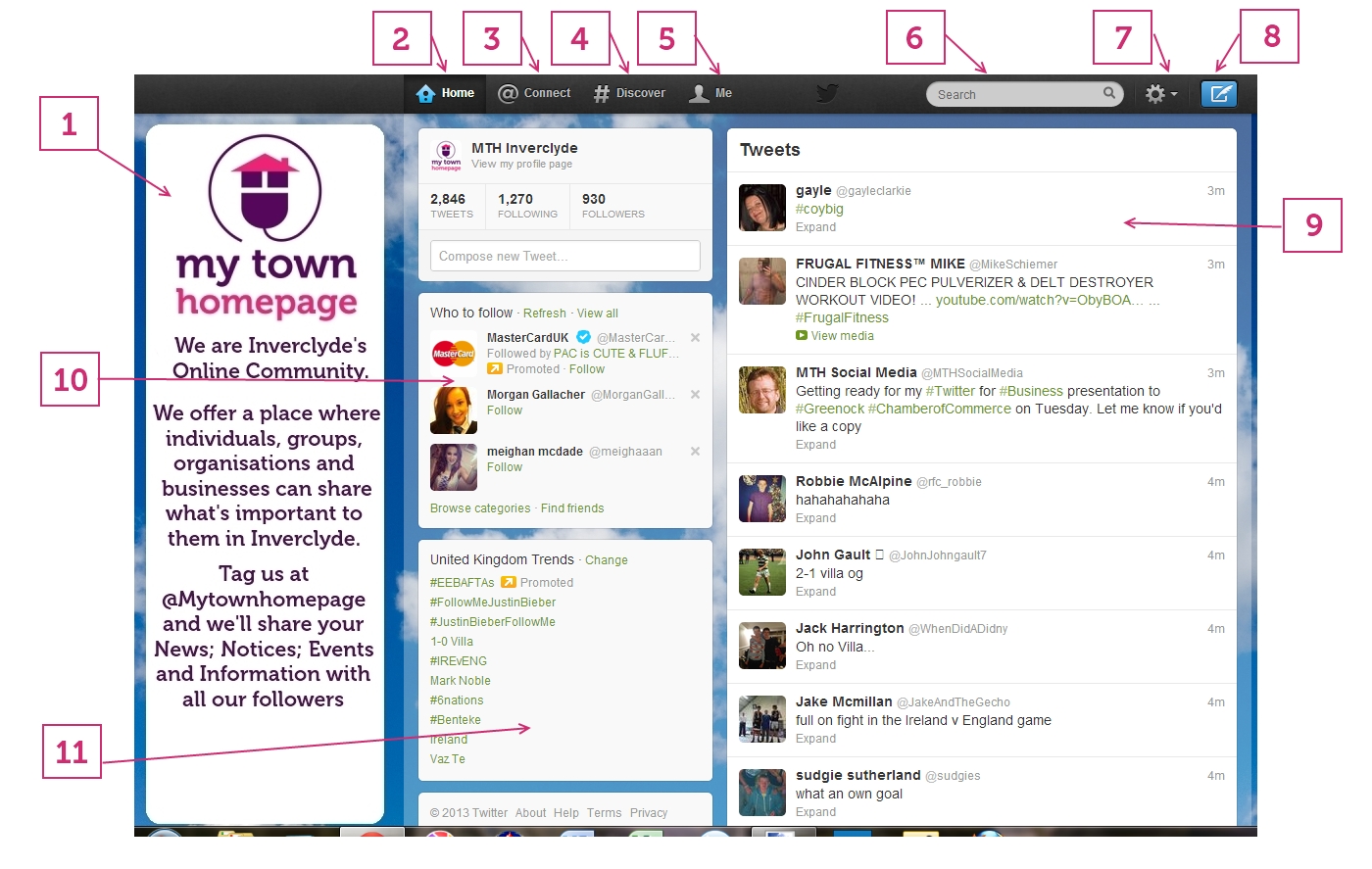
    Figure 1 - Parts of Your Twitter Account

    BOX 1 - Background Image - The background image on your Twitter account can either be one of the templates that Twitter offers you or a bespoke image that you can upload.

    To choose a template or upload your own image

    1. Click on the Wheel icon (see number 7 in Figure 1 above)
    2. Click on Settings
    3. Click on Design
    4. Pick a Template or upload your own. We recommend that you use an image that is 1920 x 1080 px

    BOX 2 - Your “Home” View. Figure 1 shows you what your screen will show when you are in the “Home” section of your Twitter Page. Your “Home” shows you the latest “stream” of Tweets from everyone that you are following. The stream will be in chronological order and will not (yet) be filtered in any way.

    It’s easy therefore to look at this stream and see a great deal of irrelevant information. Our analogy is that it’s like getting a radio and hearing all of the stations all at the one time. You’ll hear a lot of NOISE and you need to “tune in” to what you want. We’ll cover how to do this later.

    BOX 3 - Your “Connect” or “@” View - This view will let you see who has "interacted" with you. It will show you

    1. who has followed you
    2. who has Re-Tweeted (RT) any of your Tweets
    3. who has marked any of your Tweets as a “Favourite”
    4. who has mentioned your username in any of their Tweets.

    BOX 4 - Your “Discover” or “#” View - This view will let you see some of the activity of your followers. For example it will show you;

    1. who they’ve followed so that you might decide to follow them too.
    2. a sample of some of the Tweets that they have marked as a “Favourite”
    3. recommendations on who Twitter recommend you should follow.

    BOX 5 - Your “Me” View - This View will let you see all of the Tweets that you have made in chronological order. It will also give you access to the following very useful information, for example you can see;

    1. details of everyone who has followed you
    2. everyone who you follow
    3. a list of all the tweets that you have marked as being a “Favourite” of yours
    4. details of all your “Lists”. We’ll discuss Lists, how to set them up and what you can use them for later.
    5. Your “Direct Messages” - these are private messages that have been sent to you and can be seen by clicking on the “envelope” icon at the top right of your Page under your photo. We’ll discuss how these later.

    BOX 6 - The “Search” Box - This is obviously where you can search for things that have been said by any person on Twitter. Because it searches through what is being said by anyone and everyone it’s actually a very powerful tool and something that will be extremely useful for you and your Business. We’ll discuss ways that you can use this effectively later.

    Box 7 - Settings - This gives you access to your settings where you can adjust things like;
    1. your password
    2. your username
    3. background image
    4. how you receive updates and notifications
    5. the profile info and images people see when they look at you on Twitter

    BOX 8 - New Tweet - Click here when you want to add a new tweet.

    BOX 9 - Your “Stream” - This view changes depending which section of your Twitter page you’re on or whether you’ve searched for something. For example, in "Home" you’ll see a list of tweets from everyone you follow. In "Me" it shows all your latest tweets. In "Search" it gives a list of your search results. Whichever page you’re on it will show you a “Stream” of Tweets. What you can do with these will be discussed later.

    BOX 10 - Who to Follow - Some Twitter suggestions about who to follow

    BOX 11 - Trends - Some Twitter categories and subjects that are currently popular. You can change the settings of this so that you see the trends i your nearest city or in a city or country of your choosing.

    5. How to Use Twitter - Basics and Vocabulary


    Here’s a list of some of the basic things that you should be able to do on Twitter if you’re going to be using it for your Business;

    1. “Send” a Tweet - Tweets are 140 characters long within which you can use things like links, a location, photos, videos etc. The language that you use in a Tweet is explained below.

    2. “Reply” to or “Mention” someone using @ - If you put an @ sign immediately before a username then this provides a link in your Tweet to that person's Twitter account. Anyone clicking on the “@username” will be taken to that person’s Twitter Page. It also lets that user know that you've mentioned them. It's like sending a message to them that everyone can see.

    Anyone can put your “@username” in their Tweet. When they do that you’ll receive a notification that that person has “mentioned” you.

    Figure 2 - Example of a “mention”

    In the example in Figure 2 above, both “Mytownhomepage” and “wisepc” will receive a notification that cloudCEO has mentioned them in a tweet.

    3.   “Discover” or “Search” Using # -  You can search for something or discuss a topic using the # (hashtag) sign.  The # sign immediately before a word provides an easy way to search for that word or an easy way to group replies around a topic.

    For example, if you say #Greenock it means that people clicking on that word will see all texts that have mentioned the same "hashtag" i.e # Greenock. Similarly if you want to discuss a topic like #Morton then then hashtag #Morton lets people see all tweets that have #Morton in them. It also lets everyone following that hashtag to see your tweet.  

    Figure 3 - Example of Using a Hashtag

    Hashtags are good to use for events. For example if you give an event a hashtag then this groups together everyone who wants to discuss that event. E.g. #Rydercup

    Figure 4 - Example of a Hashtag to promote an event

    4. Distribute Tweets Using “Re-Tweet” or “RT” - If you like what someone has said you can "Re-Tweet" their tweet. This lets everyone that follows you to see what that person has said. When others re-tweet your Tweets it spreads the message of what you've said to a lot more people.

    To Re-Tweet just click the Re-Tweet option at the bottom of a Tweet or copy the Tweet you want to re-tweet and begin in with “RT @Username”.

    5. Send a “Direct Message” or “DM”  - This is just like sending someone a private email or a private text. Only they can see your message. Direct messages or DMs  can only be sent if both users are following each other.

    To DM someone begin your Tweets with “d Username”

    6. “Favourite” a Tweet - If you Favourite a Tweet, this is similar to you saying that you "like" a post on Facebook. The person gets notified that you've liked their tweet. The Tweet you’ve liked also gets put into your list of Favourites which can be accessed by clicking the “Me” View (see BOX 5 in Figure 1 above)

    To Favourite a Tweet, click the “Star” Icon in the list of icons underneath a Tweet

    7. Categorise Your Followers into Lists - You can categorise your followers into lists. You can then see a “stream” for each of your lists.

    To set up a list;
    1. Click on “Me” (BOX 5 in Fig 1 above)
    2. Click on “Lists” in the left column
    3. Click “Create List” at the top of your Page.

    From a business perspective, this is a very good way for you to categorise all the people who follow you.

    8. Use “Links” in Your Tweets - You can add a link to anywhere else on the internet using links. Twitter automatically shortens all links to 20 characters. If you use other bespoke link shortening tools (like bit.ly) your links can use us even fewer characters. You can link to a photo, a video, a website page, a facebook page, etc.

    Figure 5 - Example of Using a link in a Tweet

    From a business perspective links are very important for you to drive traffic to your website, Facebook Page or Blog.

    6. Other Twitter Tips for Businesses

    There are obviously many different Twitter techniques that you can use that will help your business. However, we’ve come up with 3 things that we think you should try to do well if you want to use Twitter effectively for your Business.  

    6.1 Searching

    In our opinion, Twitter's search capability is MUCH better than Facebook or any other Social Media Platform. This can be extremely valuable for your Business. For example here are some examples of what you can search for on Twitter.
    • For a “Kilt Hire” Company - You could find everyone talking about “kilts” or “weddings” or “kilt hire” within 20 miles of your shop.
    • For a “Sandwich Shop” you can find people who have just Tweeted about “hungry” or “take away” from within 1 mile of your shop.
    • You can monitor every time someone mentions your product or brand or something that you produce
    • If you want to know what people are talking about in your town you can search for all tweets that have come from within 5 miles of where you’re based
    • Then of course you can use your Lists to filter your searches even more.

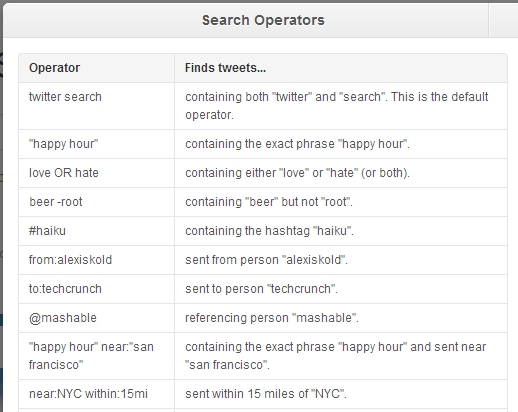
    To take advantage of this, use Twitter Operators or Advanced Search. Twitter Operators are a set of rules that you can use when you are searching for an item on Twitter. It allows you to be very specific about what you are searching for .  Advanced Search is similar but uses a Form to define your search.

    You can find Operators and Advanced Search at this link - https://twitter.com/search

    Figure 6 - Example of some Twitter Operators

    6.2 Actions

    These are the actions that you should try to cultivate on Twitter.
    • Listen (appropriately);
    • Respond
    • Share
    • Ask
    • Link

    Doing these things will ensure that your time spent on Twitter will be more effective

    6.3 Following

    In our opinion, it's a lot easier to follow people and have others follow you on Twitter than it is on other social media platforms like Facebook. When you follow someone, they get notified that you've followed them. That means that there's a chance that they'll follow you back. Also when you favourite or RT one of their tweets, they get notified. Finally, you could just ask them to follow you by Tweet (everyone will see this) or by email or Facebook if they have given that info on their Profile.

    We recommend that you regularly spend time following people who are relevant to your business. Here are some ways to follow people relevant to your business.
    1. Search for people who are Tweeting about you; or your Brand; or your product; or your service and follow them
    2. Search for people who Tweet from near where your shop or service is
    3. Find someone who likes your product and follow their followers
    4. Find a competitor and follow the people following them
    5. Find someone who produces something similar to you and follow people who follow them

    7. Connecting Facebook and Twitter

    In our opinion you should share Posts and Tweets between your Facebook and Twitter Pages but you shouldn't use the same language on both. We wouldn't recommend you therefore using the setting on Twitter that automatically shares your Tweets on to your Facebook Page.

    Having said that, you may have people on your Facebook Page that you want to introduce to your Twitter Page and vice versa. We recommend that you "welcome" all new followers with a brief Bio about your company with a short call to action.

    • E.g. To your Twitter followers you could send a message that says something like "Thanks for following us - Find out more here http://ow.ly/hDio9 + LIKE us on Facebook too http://ow.ly/hDimh Thanks

    We think that it’s possible to grow your Facebook and Twitter Pages faster if you have BOTH a Twitter and Facebook Page.

    8. Twitter Apps and Tools

    There are lots of Apps and Tools that you can use to make using Twitter more efficient for your Business. For example most people who use Twitter don’t use the Twitter Homepage to manage their experience. Many people use applications like Tweetdeck and Hootsuite to see what’s happening on their Twitter account.

    The advantages with this is that these “Client Management” programmes let you look at many different aspects of your Twitter account at the same time and they also let you save time by managing your other social media accounts too. In the example below we discuss the tool that we use i.e. Hootsuite however other Client Managers are equally as useful.


    Advantages of Using Hootsuite

    We use Hootsuite to help us co-ordinate our social media activity. Here are some reasons why...
    • It allows you to see “streams” for lots of different searches all on the one page. For example we like to see what’s happening in the Inverclyde area so we have searches for “inverclyde”, “Greenock”, “Gourock”, “Port Glasgow” etc which we can see all on one Page.
    • It allows you to search for Tweets that have come from a specific Geographical Area e.g. within 10 Kilometres or Greenock
    • If you have more than one Twitter Account e.g. a Business Account and a Personal Account, you can see what’s happening on both without the need to log out.
    • If you have other Social Media Platforms e.g. Facebook, Linkedin, Google+, Foursquare etc it allows you to see what’s happening on all these accounts all ot the same time
    • It allows you to post updates to more than one Twitter Account and more than one Social Media platform at the same time e.g. you can write an update and post it onto your Twitter, Facebook and Linkedin Accounts all at the same time.
    • You can schedule your updates in advance.

    9. Conclusions

    While Twitter is one of the most widely used social media platforms it perhaps isn’t readily seen as having a place for businesses who often use Linkedin or Facebook as a first option.

    In our opinion, Twitter is an excellent example of a social media platform that can be used in a way that can enhance your business marketing. It offers ways for you to specifically target and focus on the particular clients and customers that are relevant to your Business.

    10 Further Information

    My Town Homepage produced this series of 4 Instructional Manuals on “Social Media for Business” as a consequence of doing training for Greenock Chamber of Commerce, Inverclyde Council and a number of individual businesses.

    In the near future we will be also adapting our knowledge and using our skills and experience with Local Government and the Third Sector to produce similar Manuals for Voluntary Groups, Community Organisations and the Public Sector.
    If you think this might not be for you, check out our other services. 


    • Assessment - Where are you on the Social Media Evolution? - Free Analysis
    • Training - Introduction, Basics, Advanced - Free Manuals and Bespoke Training from only £15 per Hour
    • Establish - We Can Get you Started on Your Social Media Journey - From £30
    • Promote - Publicise You through our own Network of Followers - £40 per month
    • Strategy - Your 10 Point Social Media Health Check - Your Strategy From £49
    • Growth - We guarantee to grow your Likes OR followers - From only £10 per month
    • Management - Let us Manage Your Social Media - £49 per month or £499 per year
    • Entry Level Support - Find out what we can do for you for £10 per week


      If you would like any further information on anything discussed in this Information Manual please contact Willie Wilson on the details below.

      Willie Wilson
      Managing Director
      My Town Homepage
      Email admin@mytownhomepage.co.uk
      Tel - 07932 644455
      Website - http://www.mytownhomepage.co.uk
      Facebook - https://www.facebook.com/mthsocialmedia
      Facebook - https://www.facebook.com/mytownhomepageinverclyde
      Linkedin - http://uk.linkedin.com/in/williewilson1